AWS Command Line Interface (CLI) Integration
This technical module outlines the configuration and deployment of the AWS CLI toolset within high-performance computing (HPC) environments to manage scalable cloud storage fabrics directly from terminal sessions.
Core Capabilities and Use Cases
- Uploading and downloading data from Amazon S3
- Synchronizing large datasets with cloud storage
- Automating AWS workflows via scripts and SLURM jobs
Load Module and Configure Authentication
ssh cwid@scu-login01.med.cornell.edu
OR
ssh cwid@scu-login02.med.cornell.edu
OR
ssh cwid@scu-login02.med.cornell.edu
⚠️ Warning: Data transfers and heavy compute tasks should never be run directly on login nodes. You must start an interactive
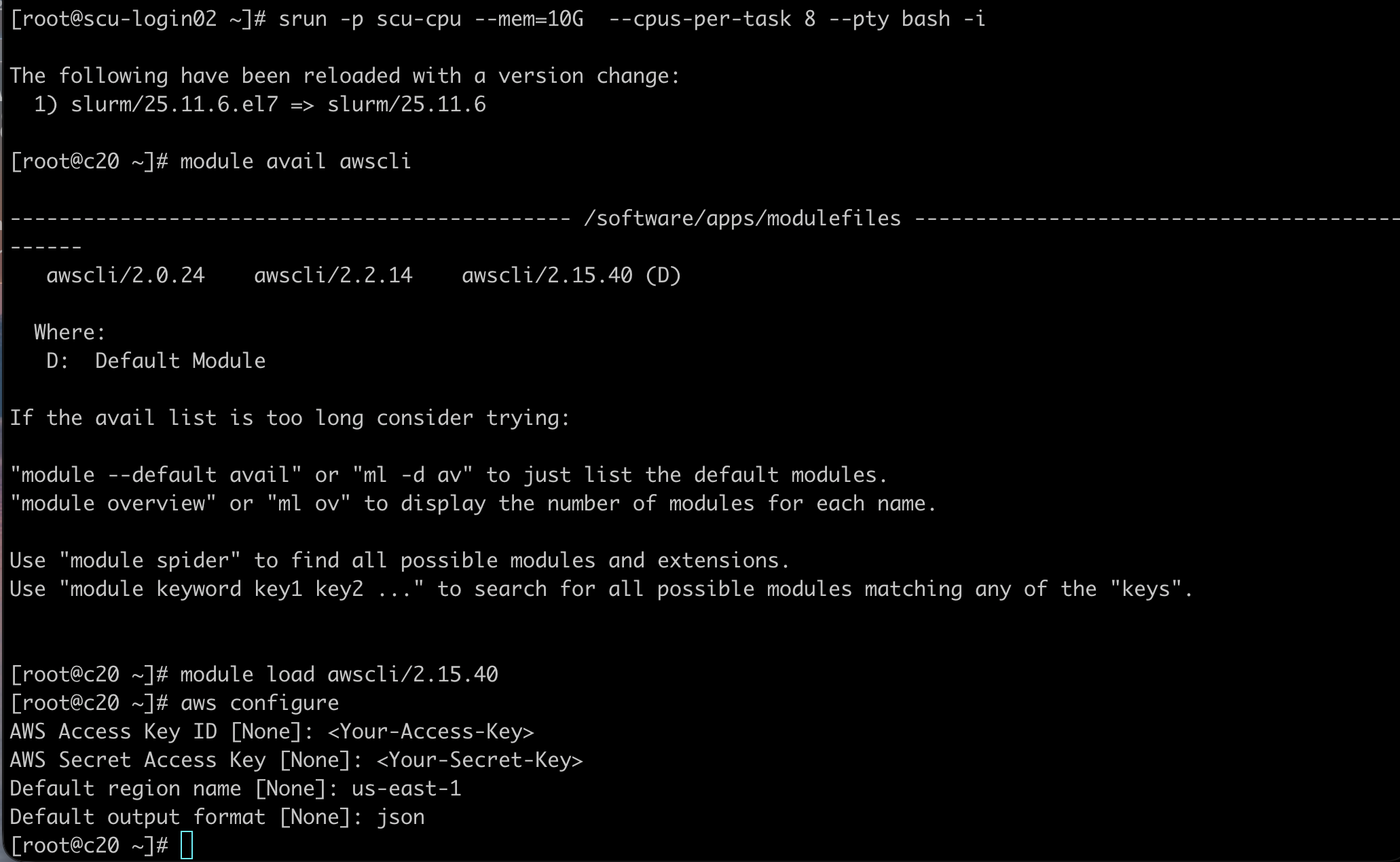
srun session first. Please review the Login Nodes Policy for more details.scu-hpcc@scu-login02 $ srun -n1 --pty --partition=<partition_name> --mem=8G bash -i
scu-hpcc@scu-login02 $ srun -n1 --pty --partition=<partition_name> --mem=8G bash -i
scu-hpcc@c16 $ module avail awscli
scu-hpcc@c16 $ module load awscli/<version>
scu-hpcc@c16 $ aws configure
scu-hpcc@c16 $ module avail awscli
scu-hpcc@c16 $ module load awscli/<version>
scu-hpcc@c16 $ aws configure
ℹ Note: Your AWS access keys are sent to you by ITS using transfer.med.cornell.edu. You will be prompted for your credentials and default settings:
AWS Access Key ID [None]: <Your-Access-Key>
AWS Secret Access Key [None]: <Your-Secret-Key>
Default region name [None]: us-east-1
Default output format [None]: json
AWS Secret Access Key [None]: <Your-Secret-Key>
Default region name [None]: us-east-1
Default output format [None]: json
Basic S3 Storage Operations
List Buckets
# List buckets
aws s3 ls s3://your-bucket-name/
2025-09-01 15:12:48 my-research-bucket
2025-09-02 09:20:13 project-data-storage
aws s3 ls s3://your-bucket-name/
2025-09-01 15:12:48 my-research-bucket
2025-09-02 09:20:13 project-data-storage
Copy Files (Upload/Download)
# Download from S3
aws s3 cp s3://my-bucket/file.txt .
# Upload to S3
aws s3 cp localfile.txt s3://my-bucket/path/
# Copy between buckets
aws s3 cp s3://bucket-a/file.csv s3://bucket-b/file.csv
aws s3 cp s3://my-bucket/file.txt .
# Upload to S3
aws s3 cp localfile.txt s3://my-bucket/path/
# Copy between buckets
aws s3 cp s3://bucket-a/file.csv s3://bucket-b/file.csv
Advanced Sync Options
# Dry Run (Preview changes without moving files)
aws s3 sync s3://my-bucket/project-data ~/Desktop/project-data --dryrun
# Progress View
aws s3 sync s3://my-bucket/project-data ~/Desktop/project-data --progress
aws s3 sync s3://my-bucket/project-data ~/Desktop/project-data --dryrun
# Progress View
aws s3 sync s3://my-bucket/project-data ~/Desktop/project-data --progress
ℹ Note: Sync only transfers new or changed files, making it ideal for large datasets.
Manage and Delete
# Upload directory recursively
aws s3 cp results/ s3://my-bucket/results/ --recursive
# Move file (deletes source)
aws s3 mv file.txt s3://my-bucket/file.txt
# Delete file
aws s3 rm s3://my-bucket/file.txt
# Delete folder recursively
aws s3 rm s3://my-bucket/folder/ --recursive
aws s3 cp results/ s3://my-bucket/results/ --recursive
# Move file (deletes source)
aws s3 mv file.txt s3://my-bucket/file.txt
# Delete file
aws s3 rm s3://my-bucket/file.txt
# Delete folder recursively
aws s3 rm s3://my-bucket/folder/ --recursive
⚠️️ Warning: Recursive deletes cannot be undone unless versioning is enabled on your S3 bucket.
SLURM Job: AWS Transfer Example
#!/bin/bash
#SBATCH --job-name=s3_transfer
#SBATCH --partition=scu-cpu
#SBATCH --time=02:00:00
#SBATCH --cpus-per-task=2
#SBATCH --mem=4G
module load awscli/2.15.40
aws s3 sync s3://my-bucket/project-data /athena/labname/scratch/cwid
echo "Download complete"
#SBATCH --job-name=s3_transfer
#SBATCH --partition=scu-cpu
#SBATCH --time=02:00:00
#SBATCH --cpus-per-task=2
#SBATCH --mem=4G
module load awscli/2.15.40
aws s3 sync s3://my-bucket/project-data /athena/labname/scratch/cwid
echo "Download complete"
Parallel SLURM Transfers
#!/bin/bash
#SBATCH --job-name=parallel_s3
#SBATCH --array=1-10
#SBATCH --cpus-per-task=1
#SBATCH --mem=2G
#SBATCH --time=12:00:00
#SBATCH --output=logs/s3_%A_%a.log
module load awscli/2.15.40
SUBSET_DIR="/path/to/data/subset_${SLURM_ARRAY_TASK_ID}"
BUCKET="s3://your-bucket/subset_${SLURM_ARRAY_TASK_ID}/"
aws s3 sync ${SUBSET_DIR} ${BUCKET} --region us-east-1
#SBATCH --job-name=parallel_s3
#SBATCH --array=1-10
#SBATCH --cpus-per-task=1
#SBATCH --mem=2G
#SBATCH --time=12:00:00
#SBATCH --output=logs/s3_%A_%a.log
module load awscli/2.15.40
SUBSET_DIR="/path/to/data/subset_${SLURM_ARRAY_TASK_ID}"
BUCKET="s3://your-bucket/subset_${SLURM_ARRAY_TASK_ID}/"
aws s3 sync ${SUBSET_DIR} ${BUCKET} --region us-east-1